comfy-test
comfy-test is installation and execution testing infrastructure for ComfyUI custom nodepacks.
Through the "comfy-test run" command, it does three things, the way a real user would:
-
Installs the nodepack.
-
Drives real workflows against it: queues actual workflow JSONs on the running server and checks it actually executes.
-
Produces a results gallery: an HTML report with a per-lane video of each workflow running, plus memory and performance logs (RAM, VRAM, CPU, CUDA).
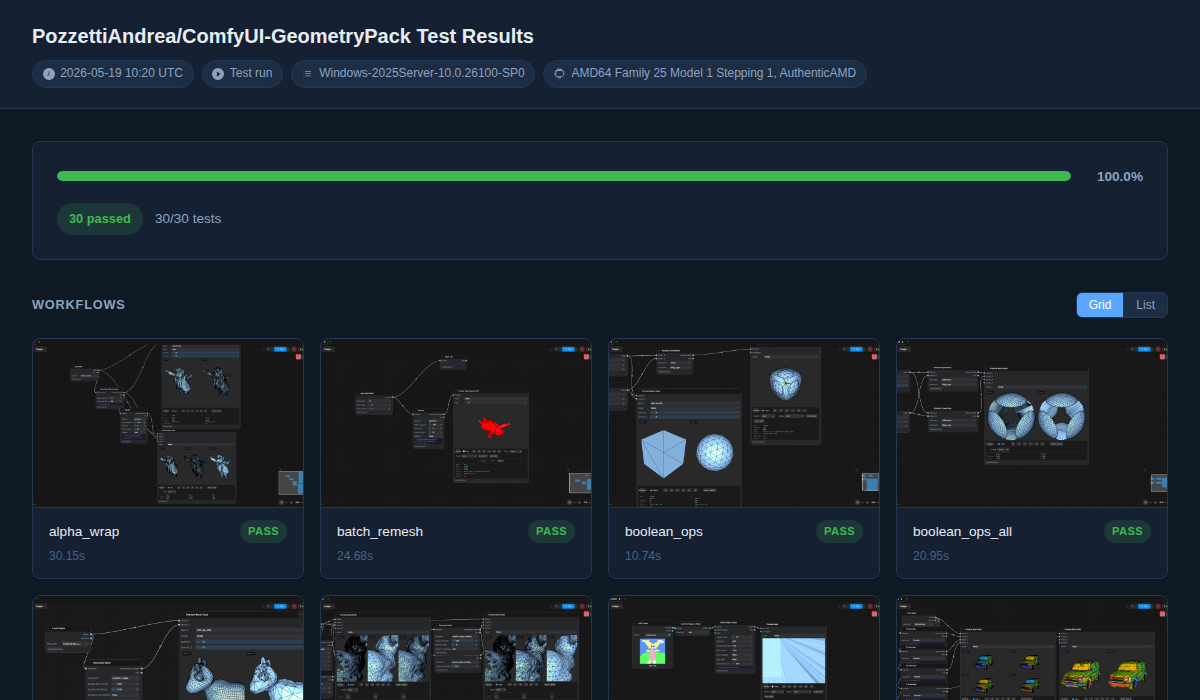
In this way, example_workflows/ or workflows/ folders in custom nodepacks become both
documentation and testing.
OS/installation method coverage
comfy-test can run on every OS ComfyUI runs on:
- Windows
- Linux
- macOS
And across every officially supported ComfyUI installation type:
- git-cloned ComfyUI (all three): a fresh venv with a real server (
main.py) - the portable bundle (Windows only): the official embedded-Python build
- the Desktop app (Windows and macOS): the Electron app, driven over CDP
For the anatomy of a single run: what a run does.
Supported usage methods
comfy-test can be pointed at a custom nodepack in four different ways.
| Intent | Who it's for | Who drives | Results land |
|---|---|---|---|
| Local / offline | a developer with one node | comfy-test run <NODEPACK> in a terminal |
on the machine -- with a --publish workflow to share them to your GitHub repo |
| Self-serve CI | a developer with one node | automated GitHub Actions on a repo | your repo's gh-pages |
| Central dispatcher (comfy-ci) | a developer with several nodes who has local GitHub runners and doesn't want to open a GitHub org (GitHub won't let you register the same GPU machine to multiple repos) | automated GitHub Actions on a central repo with write access to the node repos | pushed back to each node's own repo |
| Registry gate (comfy-forge) | the comfy-forge registry | the registry, on ingest | kept by the registry as a verdict / badge |
Each is expanded in using comfy-test.
Accelerators
comfy-test aims to cover all the OSes ComfyUI users run, all installation types and also all available accelerators!
This means that we eventually want to allow node creators to test their nodes on and across:
- CUDA
- ROCm
- MPS
- XPU
As of 0.5.0, only CUDA is supported.
| Install method | Linux | macOS | Windows |
|---|---|---|---|
| Server (git-cloned ComfyUI) | CPU · CUDA | CPU (MPS) | CPU · CUDA |
| Portable (embedded Python bundle) | X | X | CPU · CUDA |
| Desktop (Electron app) | X | CPU | CPU · CUDA |
Each combination of (os x accelerator x install method) is called a "lane". As of 0.5.0, there are ten lanes in all. See the lanes docs for the full per-lane breakdown.
CLI
Besides the basic "comfy-test run" command, there's a few more commands like "publish" or "lint". You can find the full reference here: commands reference.
Relationship to comfy-env
comfy-test knows about comfy-env as an optional peer, not a dependency.
If it is testing a comfy-enved package it reads comfy-env.toml for declared
[cuda] packages and comfy-env-root.toml for [node_packs], probes
comfy-env's materialized workspace to see which of those CUDA packages actually
landed (and mocks the ones that did not, since a CUDA import fails without a
GPU), applies any [env_vars] the pack declares, and logs the installed
comfy-env version alongside its own in every run.
The probe is per-ABI: with no materialized environment for the running ABI it says so and treats every declared package as absent, rather than assuming.